Seeing how long users spend active across pages after login
New

Our Fullstory account will show sessions across pages, and I’m wondering if there’s a way to see the duration that users are active after visiting a specific page. So after login, I’d like to see the average length of time a user is active. I can’t find this in my dashboards or figure it out in metrics, any help would be very appreciated!
0
Comments
2 comments
Hey @Kat ! Thanks for your post.
While we don’t currently offer a filter to determine total active session time after a certain point, we may have a workaround that will be suitable for you.
If you have your login page defined in FullStory (more about Page Settings here), you can utilize a metric to parse out how much time folks are active on pages other than your login page. To do so, you’ll add a ‘Visited Page > is not > Login page’ filter to a metric and then add an operator to subtract time spent on other pages via a ‘Visited Page > is > Login page’ filter. Example screenshot from our demo environment:
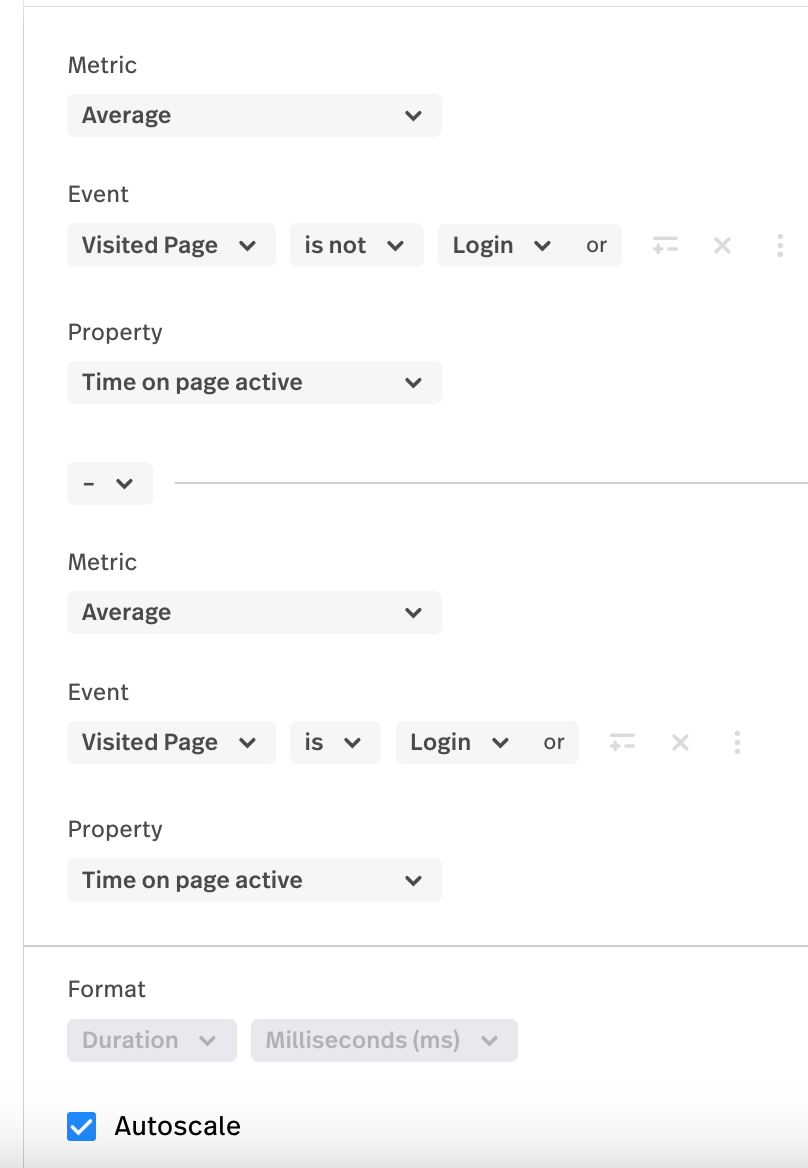
In the screenshot above, I chose ‘Average’ as the measurement parameter but you could choose median, sum, etc. The important part is to choose ‘Time on page’ or ‘Time on page active’ as the parameter.
Do you think a metric like the one shown above might provide you with some of the data you’re interested in?
Thank you for the tips, @Tym I’ll look into that!
Please sign in to leave a comment.