How to deal with a change in CSS selector for the same element
New

Hello friends,
I’m familiar with using CSS selectors to define named elements. My question is about how to handle scenarios where the CSS selector for an element changes. Let’s say I have a button for playing a video and it has a specific CSS selector, which I’ve used to create a Defined Event that is in several of my Metric and Funnel reports. Now the button’s appearance and position changes - but its function remains the same - so the CSS selector is changed as well. What’s the best way to address this situation while maintaining continuity in all my existing reports?
0
Comments
6 comments
Hey @mentat-analytics! Thank you so much for posting! This is a great question!
I see our awesome support team has answered your question for you, but in the event someone else has a similar question, I’ll share the answer here as well:
Please don’t hesitate to reach out should you have any other questions! 😊
Hey @mentat-analytics! Thank you so much for posting! This is a great question!
I see our awesome support team has answered your question for you, but in the event someone else has a similar question, I’ll share the answer here as well:
Please don’t hesitate to reach out should you have any other questions! 😊
Hi @lindsay! Thank you for sharing the support team’s response here. While I’m very appreciative of the support team’s quick and thorough response, I wouldn’t consider the bit you shared to be the solution to this issue. Because it’s still assuming that the CSS selector didn’t fully change, while my question was about how to handle a scenario where there is a complete change.
In their followup reply they clarified that FullStory doesn’t currently support the handling of this scenario, so it should be filed as a feature gap as opposed to something that’s addressable in the product. An ideal solution would be to allow Named Elements and Defined Events to have time filters applied to their CSS selectors. So I could say that a defined event is triggered by selector #1 in one date range and selector #2 in in another.
Not sure if there is a place to share product gaps and feature requests, but if there is I’m happy to share this there too.
Hey @mentat-analytics! Thank you so much for sharing that with me!
I got caught up on the support ticket and can now see the further details about not having a unique identifier. I’m sorry to hear this isn’t a solution for your case!
I appreciate you sharing that suggestion, and you can absolutely share feedback here in the Community! I have just submitted this feature request on your behalf.
Please don’t hesitate to reach out should you have any more questions!
Hi @mentat-analytics! I forgot to mention another solution on how to maintain continuity of your reports when your CSS selector changes.
When updating your CSS selector, you can select the “or” button to track both the old and new selector so if an event matched either of these definitions, it will still meet the criteria. 😊
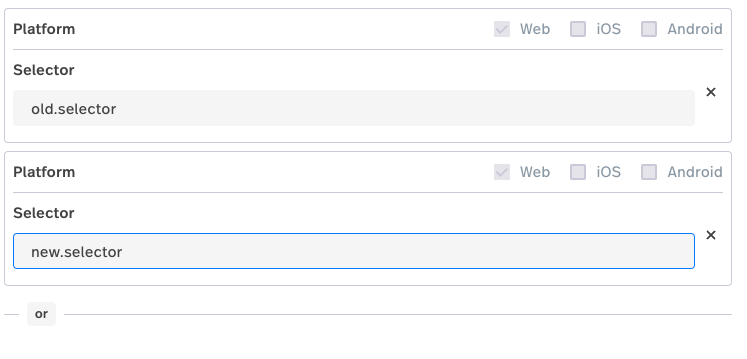
You can also add a note in the description of the date the selector changed for tracking purposes. That way you can maintain the history while tracking new activities!
Hope this helps! Please don’t hesitate to reach out if you have any further questions.
@lindsay thanks for the suggestion! I feel like the “or” approach is a really good one and appropriate for most use cases like this. The only time it wouldn’t work is if the CSS for an element changes and the old one gets assigned to a different element, which I imagine is unlikely. So I’ll use this method going forward.
And thanks for filing the feature request!
Hey @mentat-analytics! I’m so glad to hear this solution will work in most cases for you!
Anytime, and please let me know if anything else comes up. Happy to help! 😊
Please sign in to leave a comment.